Migrating PrimeNG from v16 to v21: A Version-by-Version Guide
The article I wish existed when I started this migration.
If you’ve been putting off upgrading PrimeNG, I completely understand. The jump from v16/v17 to v18 was — to put it charitably — brutal.
The PrimeNG team rewrote the entire theming system from scratch, removed a bunch of components without clean drop-in replacements, and shipped a migration guide that essentially said “start over.”
Developers across GitHub discussions and Reddit threads called it one of the most painful library migrations they’d ever done. One thread from the official PrimeNG repo had someone write: “I had to abandon my upgrade to v18, unfortunately.” Another suggested the only path forward was to “create a new project in a separate folder and copy your src.” Some just abandoned it entirely.
I went through it anyway — v17, v18, v19, v20, and v21 — and this guide documents everything I learned. It’s structured exactly how a developer would tackle this: one version at a time. If you’re moving from v16 to v21, you don’t skip versions. You walk through each one, understand what changed, and fix it. That’s what this article will help you do.
Table of Contents
- Before You Touch Anything
- What Are Design Tokens?
- The Old Way vs. The New Way
- Upgrading to PrimeNG v18: The Hardest Step
- 1. Remove the Legacy Theme Imports
- 2. Fix tsconfig.json Module Resolution
- 3. Install the Themes Package
- 4. Create Your Theme Preset
- 5. Wire Up
providePrimeNGin App Bootstrap - 6. Update Component Imports — The Complete Rename List
- If You Extend PrimeNG Components
- Handle the size Input Conflict
- 7. Remove Redundant Constructors from Extended Components
- 8. Migrate TabView to the New Tabs Structure
- 9. Migrate Accordion to the New Panel Structure
- 10. Replace Deprecated and Removed Components
- 11. Update the Message Type Import
- The Single Message Component
- 12. Update CSS Classes and Variables
- 13. Also Removed: Sidebar / Drawer size Property
- 14. Tree Component — DOM and Selection Class Renames
- 15. Avatar — containerClass Removed from Base
- 16. Breadcrumb — isCurrentUrl Removed from Base
- 17. Pass-Through Attributes for Stable SCSS Targeting
- Upgrading to PrimeNG v19
- Upgrading to PrimeNG v20
- Upgrading to PrimeNG v21
- The Full Migration Checklist
- Final Words
Before You Touch Anything
The single biggest reason v18 broke everyone was the complete replacement of the SASS theming system with Design Tokens. If you don’t understand this change conceptually before looking at the code, the new configuration will feel arbitrary and confusing. Spend five minutes here — it’ll save you hours later.
What Are Design Tokens?
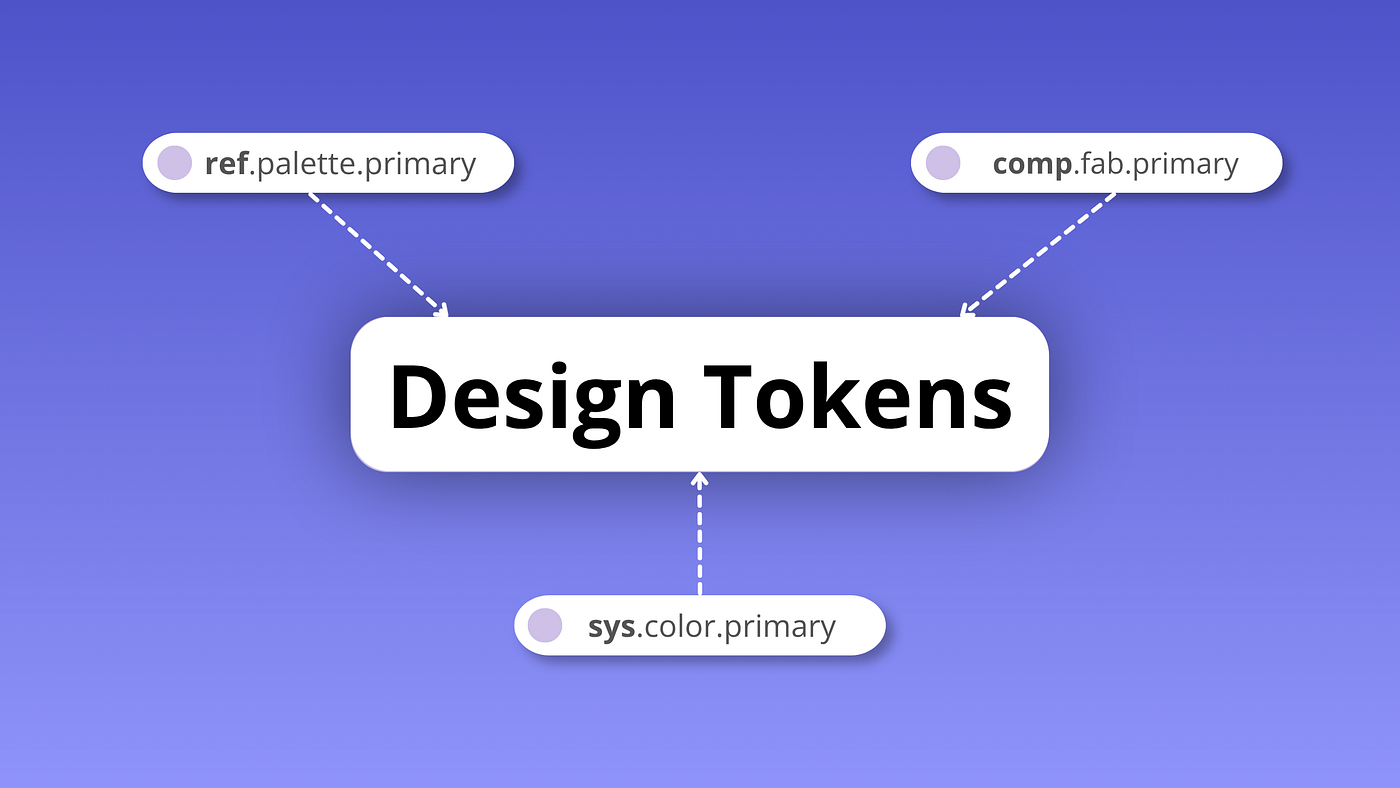
Design Tokens
Design tokens are small, reusable design decisions that make up a design system’s visual style. Tokens enable a design system to have a single source of truth. Instead of writing color: #2095f3 in a dozen SCSS files, you define a token — say, primary-color — and reference that token everywhere. Change the token’s value once, and every component using it updates automatically.
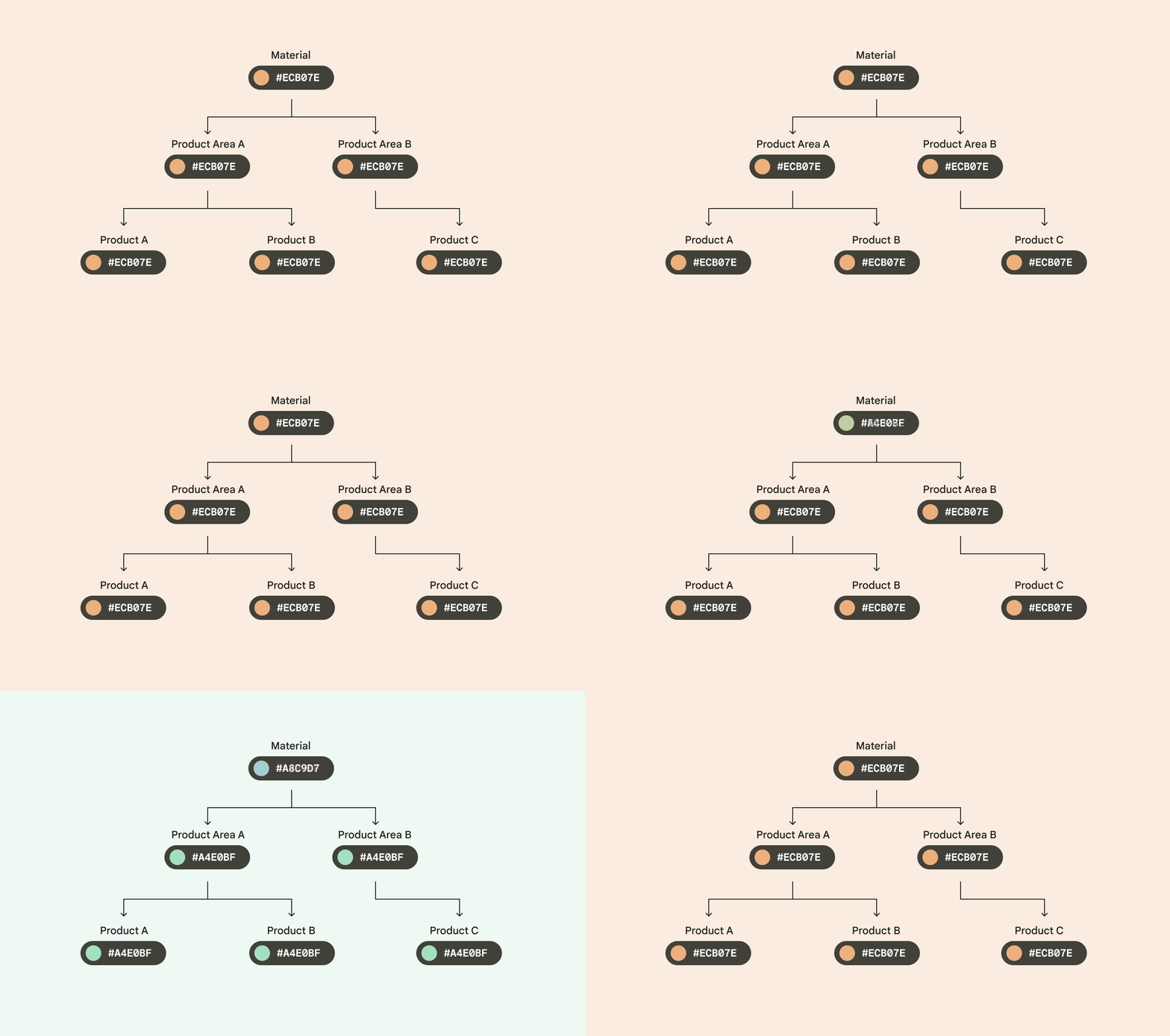
How Design Tokens act as a single source of truth. Example from doc.
Because tokens are reusable and purpose-driven, they can define system-wide updates to themes and contexts. By using tokens for design and implementation, style updates propagate consistently through an entire product or suite of products. They also help designers and engineers “speak the same language,” reducing confusion during handoff from design to implementation.
Design Tokens exist in three layers:
- Reference tokens (ref) — These tokens contain raw values, such as colour hex codes or font sizes. For eg,
ref.palette.primary: #2095f3. Reference tokens don’t change based on context. These tokens start with a prefix ref. - System tokens (sys) — These tokens define the semantics or the context of the token in the UI. This is where theming occurs. The system token can point to different reference tokens depending on the context, such as a light or dark theme. For eg,
sys.color.primary: ref.palette.primary. These tokens start with a prefix sys. - Component tokens (comp) — These represent the elements required to compose a component, such as containers, label text, and icons. Whenever possible, component tokens should point to a system or reference token and not contain hardcoded values such as hex codes.
comp.fab.primary: ref.palette.primary. These tokens start with a prefix comp.
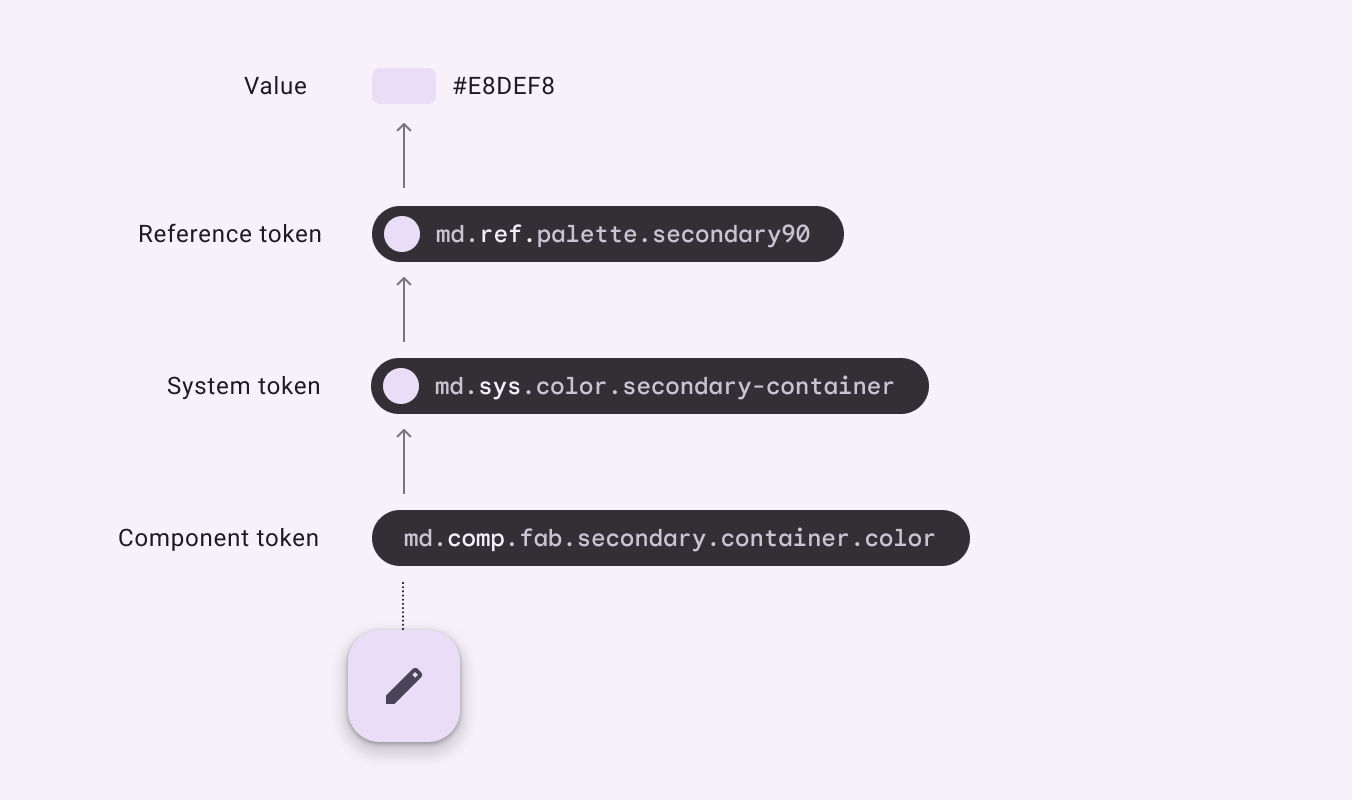
Design Token hierarchy. Example from doc.
As can be seen in the above diagram:
- Reference token should always have the raw value.
- System token should point to the Reference Token and provide semantics to the UI.
- Component token are specific to a particular component or element in the UI. They should always point to the system or reference token & not contain hard-coded values.
On the web, these tokens become CSS custom properties (CSS variables). Dark mode becomes as simple as overriding system tokens under a .dark selector at runtime. No CSS file swapping. No SASS compilation. The browser resolves the variables dynamically.
This is exactly what PrimeNG adopted in v18.
The Old Way vs. The New Way
In v16 and v17, PrimeNG shipped compiled theme CSS files. You’d reference them in angular.json and that was your entire theming setup:
// angular.json — the v16/v17 way
"styles": [
  "node_modules/primeng/resources/themes/lara-light-blue/theme.css",
  "node_modules/primeng/resources/primeng.min.css",
  "node_modules/primeicons/primeicons.css",
  "src/styles.css"
]
Simple, but completely inflexible at runtime. Dark mode meant swapping the entire stylesheet. Customization meant forking the SASS source or writing fragile overrides.
In v18, those CSS files don’t exist anymore. Theming is now code: a JavaScript/TypeScript object called a preset that defines your token values, wired up through a provider function at application bootstrap.
That’s the model. Keep it in mind as you read through each version below.
Upgrading to PrimeNG v18: The Hardest Step
This is the big one. Almost everything that broke in the community’s v18 experience happened here. Take it section by section.
1. Remove the Legacy Theme Imports
The first thing to do — before changing a single component — is clean up angular.json. Delete the theme and primeng CSS lines shown. Keep primeicons/primeicons.css; that still works as before.
// Before
"styles": [
  "node_modules/primeng/resources/themes/lara-light-blue/theme.css",
  "node_modules/primeng/resources/primeng.min.css",
  "node_modules/primeicons/primeicons.css",
  "src/styles.css"
]
// After
"styles": [
"node_modules/primeicons/primeicons.css",
"src/styles.css"
]After removing them, your app will look completely unstyled. That’s expected. You haven’t told PrimeNG what theme to use yet.
2. Fix tsconfig.json Module Resolution
This is a sneaky one. PrimeNG uses ES module export maps to expose sub-paths like primeng/select, primeng/datepicker, and so on. The legacy "node" module resolution strategy in TypeScript can’t handle these correctly — and it fails silently. Your build succeeds, but styles or imports just don’t work, and nothing in the compiler output tells you why.
Open tsconfig.json and set:
{
  "compilerOptions": {
    "moduleResolution": "bundler"
  }
}
If it already says "bundler", you’re fine. If it says "node", change it now before doing anything else.
3. Install the Themes Package
In v18, you’ll use @primeng/themes. One important thing to know upfront: the version of @primeng/themes does not need to match your primeng major version. They are separate packages with an independent release cadence.
npm install @primeng/themes4. Create Your Theme Preset
Your preset is the TypeScript object that replaces your old theme CSS file.
There are 2 ways to create your preset file:
- Extending from existing preset: The simplest approach is to extend a built-in preset like Aura and override only the parts that match your brand.
- Creating a new preset: The second approach is to create a new preset for your custom app themes. I opted for this method as we require more control over each value.
Create a file like src/theme/app-theme-preset.ts.
4.a Extending from existing preset:
import { definePreset } from '@primeng/themes';
import Aura from '@primeng/themes/aura';

// Extending from a pre-defined PrimeNG preset
export const AppThemePreset = definePreset(Aura, {
  // Reference token
  primitive: {
    blue: {
      // The codes here go all the way to 950
      50: '#E3F2FD',
      100: '#BBDEFB',
      200: '#90CAF9',
      300: '#64B5F6',
      400: '#42A5F5',
      500: '#2196F3',
      600: '#1E88E5',
      700: '#1976D2',
      800: '#1565C0',
      900: '#0D47A1',
      950: '#043560',
    }
  },
  // System token
  semantic: {
    primary: {
      50: '{blue.50}',
      100: '{blue.100}',
      200: '{blue.200}',
      300: '{blue.300}',
      400: '{blue.400}',
      500: '{blue.500}',
      600: '{blue.600}',
      700: '{blue.700}',
      800: '{blue.800}',
      900: '{blue.900}',
      950: '{blue.950}',
    },
  },
  // Component token
  components: {
    button: {
      // ...
    },
    // ...
  }
});
4.b Creating new preset:
// Creating a new preset based on your custom app theme
export const AppThemePreset = {
  // Reference token
  primitive: {
    blue: {
      // The codes here go all the way to 950
      50: '#E3F2FD',
      100: '#BBDEFB',
      200: '#90CAF9',
      300: '#64B5F6',
      400: '#42A5F5',
      500: '#2196F3',
      600: '#1E88E5',
      700: '#1976D2',
      800: '#1565C0',
      900: '#0D47A1',
      950: '#043560',
    },
  },
  // System token
  semantic: {
    primary: {
      50: '{blue.50}',
      100: '{blue.100}',
      200: '{blue.200}',
      300: '{blue.300}',
      400: '{blue.400}',
      500: '{blue.500}',
      600: '{blue.600}',
      700: '{blue.700}',
      800: '{blue.800}',
      900: '{blue.900}',
      950: '{blue.950}',
    },
  },
  // Component token
  components: {
    button: {
      // ...
    },
    // ...
  }
};
Notice {blue.500} — that’s a token reference, not a hex value. You’re telling PrimeNG: “my primary color should resolve to whatever blue.500 is.”
This is the design token hierarchy at work: your system token points to a reference token, and PrimeNG handles the CSS variable output automatically.
You can get the entire list of supported tokens for the Aura preset for v18 here.
5. Wire Up providePrimeNG in App Bootstrap
This replaces the old PrimeNGConfig constructor injection pattern entirely. Everything goes through providePrimeNG from primeng/config now.
Before (v16/v17):
import { PrimeNGConfig } from 'primeng/api';

@Component({ selector: 'app-root' })
export class AppComponent {
  constructor(private config: PrimeNGConfig) {
    this.config.ripple = true;
  }
}
After (v18+): Based on your app’s architecture, you can add this provider either in your app.module.ts or app.config.ts file.
// app.module.ts
import { NgModule } from '@angular/core';
import { BrowserModule } from '@angular/platform-browser';
import { BrowserAnimationsModule } from '@angular/platform-browser/animations';
import { providePrimeNG } from 'primeng/config';
import { AppThemePreset } from './theme/app-theme-preset';

@NgModule({
  declarations: [AppComponent],
  bootstrap: [AppComponent],
  imports: [BrowserModule, BrowserAnimationsModule],
  providers: [
    providePrimeNG({
      theme: {
        preset: AppThemePreset,
        options: {
          prefix: 'p',
          darkModeSelector: '.my-app-dark',
          cssLayer: false,
        },
      },
    }),
  ],
})
export class AppModule {}darkModeSelectordefines which CSS class on the document body activates dark mode tokens.prefix: 'p'means all generated CSS variables will be--p-*.cssLayer: falseis the safe default unless you’re using CSS cascade layers intentionally in your own styles.
6. Update Component Imports — The Complete Rename List
A core set of components were renamed in v18. Every TypeScript import and HTML template selector needs updating. Here’s the full list:
| Old Import (v17 or earlier) | New Import (v18+) | Old Class | New Class |
|---|---|---|---|
primeng/dropdown | primeng/select | Dropdown | Select |
primeng/calendar | primeng/datepicker | Calendar | DatePicker |
primeng/inputswitch | primeng/toggleswitch | InputSwitch | ToggleSwitch |
primeng/sidebar | primeng/drawer | Sidebar | Drawer |
primeng/overlaypanel | primeng/popover | OverlayPanel | Popover |
primeng/inputtextarea | primeng/textarea | InputTextarea | Textarea |
Updated component imports in PrimeNG v18+.
Don’t Forget the Event Types Too
Renaming the component import also means renaming the event types you use in handlers. The most common one is the Dropdown change event — easy to miss because the component compiles fine but your handler typings are wrong.
Before:
import { DropdownChangeEvent } from 'primeng/dropdown';

onChange(event: DropdownChangeEvent): void { ... }
After:
import { SelectChangeEvent } from 'primeng/select';

onChange(event: SelectChangeEvent): void { ... }
If You Extend PrimeNG Components
If your design system has wrapper components that extend PrimeNG base classes, you also need to update the style provider in @Component.providers. In v18+, you must include the component’s style provider or token-based styling won’t be injected. The same pattern applies to every wrapped component:
| Wrapped Component | PrimeNG Base | Required Style Provider |
|---|---|---|
| Dropdown | Select | SelectStyle |
| Datepicker | DatePicker | DatePickerStyle |
| Toggle switch | ToggleSwitch | ToggleSwitchStyle |
| Sidebar / panel | Drawer | DrawerStyle |
| Tab navigation | Tabs | TabsStyle |
Style Providers for PrimeNG v18+.
Before:
import { Dropdown, DropdownModule } from 'primeng/dropdown';

@Component({ ... })
export class AppDropdownComponent extends Dropdown { }
After:
import { Select, SelectStyle } from 'primeng/select';
import { ControlValueAccessor } from '@angular/forms';

@Component({
  providers: [SelectStyle], // required in v18+
})
export class AppDropdownComponent extends Select implements ControlValueAccessor {
  // ...
}
Handle the size Input Conflict
If your wrapper exposes a public size input property then you may get type conflict as the PrimeNG base class also defines size as a reserved input. The fix is to alias your public input:
_customSize: 'small' | 'normal' | 'large' = 'normal';

@Input('size') set customSize(value: 'small' | 'normal' | 'large') {
  this._customSize = value;
  this.size = value as any;
}
get customSize(): 'small' | 'normal' | 'large' {
  return this._customSize;
}
7. Remove Redundant Constructors from Extended Components
In v18+, most PrimeNG components extend BaseComponent, which handles dependency injection internally. If your wrapper components inject PrimeNGConfig explicitly in a constructor, remove it.
Before:
import { PrimeNGConfig } from 'primeng/api';

// ...
constructor(config: PrimeNGConfig) {
  super();
}
After: Remove the constructor entirely if it only existed to inject PrimeNGConfig. For any advanced config access, check primeng/config or primeng/types/primeng-config for the current types.
Also note: in v18+, the Checkbox event API changed. Prefer handleChange() over the old onClick() pattern if you’re overriding checkbox behavior in a wrapper.
8. Migrate TabView to the New Tabs Structure
TabView → Tabs is more than a rename. The entire template structure changed — you need to rewrite the HTML, not just swap the selector.
Before:
<p-tabView [(activeIndex)]="activeIndex">
  <p-tabPanel header="Tab 1">Content 1</p-tabPanel>
  <p-tabPanel header="Tab 2">Content 2</p-tabPanel>
</p-tabView>
After:
<p-tabs [(value)]="activeIndex">
  <p-tablist>
    <p-tab [value]="0">Tab 1</p-tab>
    <p-tab [value]="1">Tab 2</p-tab>
  </p-tablist>
  <p-tabpanels>
    <p-tabpanel [value]="0">Content 1</p-tabpanel>
    <p-tabpanel [value]="1">Content 2</p-tabpanel>
  </p-tabpanels>
</p-tabs>
Three things to note:
- Selectors are all lowercase:
p-tablist,p-tab,p-tabpanels,p-tabpanel. Not camelCase. - The binding changed from
[(activeIndex)]to[(value)]. - Tabs and panels are now separate structural elements — the old
headerattribute onp-tabPanelis gone.
Update your module import:
import { TabsModule } from 'primeng/tabs';Update your CSS selectors according to the new structure.
9. Migrate Accordion to the New Panel Structure
Like TabView, the Accordion component didn’t just get renamed — its entire template structure was replaced. The old p-accordionTab is gone. You now compose panels explicitly using p-accordion-panel, p-accordion-header, and p-accordion-content.
Before:
<p-accordion>
  <p-accordionTab header="Section 1">Content 1</p-accordionTab>
</p-accordion>
After:
<p-accordion [value]="activePanel">
  <p-accordion-panel [value]="0">
    <p-accordion-header>Section 1</p-accordion-header>
    <p-accordion-content>
      <p class="m-0">Content 1</p>
    </p-accordion-content>
  </p-accordion-panel>
</p-accordion>
CSS class names for these components will be p-accordionpanel / p-accordionheader / p-accordioncontent (all lowercase & without space). The active state is now driven by .p-accordionpanel-active and data-p-active attributes instead of the old .p-highlight class.
10. Replace Deprecated and Removed Components
TriStateCheckbox → Checkbox with indeterminate
TriStateCheckbox was removed in v18. The official replacement uses the standard p-checkbox with the indeterminate input:
Before:
<p-triStateCheckbox [(ngModel)]="value"></p-triStateCheckbox>After:
<p-checkbox
  [binary]="true"
  [(ngModel)]="value"
  [indeterminate]="isIndeterminate"
></p-checkbox>
Also, remove any SCSS targeting p-tristatecheckbox — those selectors no longer exist.
Chips → AutoComplete (multi mode)
ChipsModule and primeng/chips are deprecated. The official replacement is p-autoComplete with multiple mode and typeahead disabled:
Before:
<p-chips [(ngModel)]="values"></p-chips>After:
<p-autoComplete
  [(ngModel)]="values"
  [multiple]="true"
  [typeahead]="false"
></p-autoComplete>
To be explicit: there is no primeng/inputchips module. If you’ve seen that path mentioned somewhere, it doesn’t exist in the official v18/v19 migration. Use AutoComplete as above.
From v20+ onwards, PrimeNG added helpers like
separator,addOnBlur, andonAddto AutoComplete to close the parity gap with old Chips — check the release notes for your target version.
Other Module Migration Reminders
Beyond the major component moves above, there are a handful of smaller module and import changes to double-check during v18 migration. The quick-reference below groups them in one place so nothing slips through.
| Old | New |
|---|---|
ChipsModule / primeng/chips | p-autoComplete with [multiple]="true" and [typeahead]="false" |
AnimateModule | Angular’s built-in animations |
DynamicDialogModule | DynamicDialog standalone |
InputTextareaModule | Textarea standalone |
InlineMessage | Message from primeng/message |
Messages (plural component) | *ngFor over singular Message |
DataViewLayoutOptions | SelectButton |
pAnimate directive | pAnimateOnScroll |
pDefer | Angular’s native @defer |
Other Module Migration in PrimeNG v18.
11. Update the Message Type Import
This small change causes confusing type errors. The Message interface you used as the payload type for toasts was renamed.
Before:
import { Message } from 'primeng/api';

messages: Message[] = [];
After:
import { ToastMessageOptions } from 'primeng/api';
// Or alias it to minimize your diff:
import { ToastMessageOptions as Message } from 'primeng/api';

messages: ToastMessageOptions[] = [];
The Single Message Component
The p-messages (plural) component was replaced with p-message (singular).
Before:
<p-messages [(value)]="messages" [closable]="true"></p-messages>After:
@for (msg of messages; track msg.detail) {
  <p-message
    [severity]="msg.severity"
    [closable]="true"
  >
    {{ msg.detail }}
  </p-message>
}
12. Update CSS Classes and Variables
With the theming overhaul, PrimeNG renamed its internal CSS classes. Any custom SCSS that targets these needs to be updated.
Removed global classes:
| Removed Class | What to Use Instead |
|---|---|
.p-fluid | fluid input on the component, or wrapper element |
.p-highlight | Component-specific selected-state classes |
.p-link | link mode or link variant |
Updated CSS Classes in PrimeNG v18+.
Renamed component class prefixes:
| Old Prefix | New Prefix |
|---|---|
.p-dropdown-* | .p-select-* |
.p-inputswitch-* | .p-toggleswitch-* |
.p-sidebar-* | .p-drawer-* |
.p-overlaypanel-* | .p-popover-* |
.p-calendar-* | .p-datepicker-* |
Renamed component class prefixes in PrimeNG v18+.
Full Surface Variable Mapping:
| Old Variable | New Token (v18+) |
|---|---|
var(--surface-a) | var(--p-surface-0) |
var(--surface-b) | var(--p-surface-50) |
var(--surface-c) | var(--p-surface-100) |
var(--surface-d) | var(--p-surface-200) |
var(--surface-ground) | var(--p-surface-ground) |
var(--surface-card) | var(--p-surface-card) |
Full Surface Variable Mapping.
CSS variable migration:
/* Old (v16/v17) */
--primary-color: #2095f3;
/* New (v18+) */
--p-primary-color: #2095f3;If you have a large SCSS codebase with many PrimeNG variable references, create a compat layer during the transition rather than updating everything at once:
// compat/_variable-aliases.scss
:root {
  --primary-color: var(--p-primary-color);
  --surface-a: var(--p-surface-0);
  --surface-b: var(--p-surface-50);
  --surface-c: var(--p-surface-100);
  --surface-d: var(--p-surface-200);
  --surface-ground: var(--p-surface-ground);
  --surface-card: var(--p-surface-card);
}
13. Also Removed: Sidebar / Drawer size Property
Easy one to miss: the size property on Sidebar (now Drawer) was removed in v18. Use responsive layout classes or utility classes to control the drawer width instead.
14. Tree Component — DOM and Selection Class Renames
If you have custom SCSS targeting Tree internals, the DOM class names changed in v18. The old flat names became hyphenated. You may need dual selectors during migration if your Tree styling is shared across versions.
| Legacy (v17 or earlier) | v18+ |
|---|---|
.p-treenode | .p-tree-node |
.p-treenode-content | .p-tree-node-content |
.p-highlight (tree selection) | .p-tree-node-selected |
Class renames in Tree Component.
15. Avatar — containerClass Removed from Base
In v18+, Avatar extends BaseComponent, and the old containerClass helper no longer exists on the base. If you’ve extended Avatar in a wrapper, reimplement a local containerClass() method:
containerClass(): Record<string, boolean> {
  return {
    'p-avatar': true,
    'p-avatar-circle': this.shape === 'circle',
    // add your custom classes here
  };
}
16. Breadcrumb — isCurrentUrl Removed from Base
Similarly, isCurrentUrl(item) was removed from the Breadcrumb base class. If you relied on it to highlight the active breadcrumb, you need to reimplement URL matching yourself:
isCurrentUrl(item: MenuItem): boolean {
  const link = item.routerLink ?? item.url;
  return this.router.url === link; // adapt to your routing rules
}
17. Pass-Through Attributes for Stable SCSS Targeting
v18+ styled mode adds data-pc-name (logical component name, e.g. drawer, checkbox) and data-pc-section (subsection, e.g. input, header) attributes to PrimeNG’s DOM. When writing SCSS overrides or design-system wrappers, these are more stable targets than generated class names — generated classes can shift between versions, but pass-through attributes are intentional API.
/* Example: target the header section of any PrimeNG drawer */
[data-pc-name="drawer"] [data-pc-section="header"] {
  background: var(--p-surface-100);
}
Upgrading to PrimeNG v19
The jump from v18 to v19 is significantly smaller than v17 to v18. The big theming overhaul is already behind you. That said, there are two things you genuinely need to handle.
1. PrimeFlex v3 Is Not Compatible — Upgrade to v4
If your app uses PrimeFlex, this is a hard requirement. The v19 migration guide is explicit: PrimeFlex v3 is not compatible with PrimeNG v18+. You need to upgrade to PrimeFlex v4.
npm install primeflex@4Review PrimeFlex’s own changelog for any utility class renames or removals as you do this.
2. Table Expanded Row Templates — Guard Both Public and Private Refs
This is the most technically subtle change in v19, and it will silently break row expansion in any custom table body. PrimeNG began exposing some template references under both a public name and an underscore-prefixed private name — for example, expandedRowTemplate and _expandedRowTemplate. If your app has a custom pTableBody component, it must check for both, or expansion stops working with no error message.
Before:
<ng-container *ngIf="!dt.expandedRowTemplate">
  <!-- regular rows -->
</ng-container>
<ng-container *ngIf="dt.expandedRowTemplate">
  <!-- expanded rows -->
</ng-container>
After:
<ng-container *ngIf="!dt.expandedRowTemplate && !dt._expandedRowTemplate">
  <!-- regular rows -->
</ng-container>
<ng-container *ngIf="(dt.expandedRowTemplate || dt._expandedRowTemplate)">
  <!-- expanded rows -->
</ng-container>
And in your template outlet binding:
<ng-template
  [ngTemplateOutlet]="dt.expandedRowTemplate || dt._expandedRowTemplate"
  [ngTemplateOutletContext]="{ $implicit: rowData, rowIndex: getRowIndex(rowIndex) }"
></ng-template>
Apply the same public || _private pattern to groupFooterTemplate and _groupFooterTemplate if you use group footers in your table.
Upgrading to PrimeNG v20
⚠️ v20 Hard-Removes All Deprecated Import Paths
This is the most important thing to know about v20, and the official guide buries it. In v18 and v19, the old import paths were deprecated but still importable — your build kept working. PrimeNG v20 physically removes them. A codebase that compiled fine on v19 with a few deprecated imports will fail to build on v20.
You must complete every migration below before upgrading to v20 (GitHub #18501):
| Removed Path / Component | Required Replacement |
|---|---|
primeng/calendar | primeng/datepicker (DatePicker) |
primeng/dropdown | primeng/select (Select) |
primeng/inputswitch | primeng/toggleswitch (ToggleSwitch) |
primeng/overlaypanel | primeng/popover (Popover) |
primeng/sidebar | primeng/drawer (Drawer) |
Chips | p-autoComplete with multiple + [typeahead]="false" |
TabMenu | Tabs without panels |
Steps | Stepper without panels |
TabView | New Tabs |
Old Accordion usage | Accordion + AccordionHeader / AccordionContent |
Messages (plural) | Loop Message or Toast |
InlineMessage | Message |
pDefer | Angular @defer |
Removed deprecated paths in PrimeNG v20.
With the above changes made, let’s see what else PrimeNG v20 has to offer.
v20 is primarily about signals spreading further into the component APIs. More inputs and state properties are now Angular signals, which means your templates and subclasses need to call them as functions.
1. Signals in Templates — disabled() and Others
The most common one you’ll hit is disabled. If you have custom templates or wrapper components reading disabled from a PrimeNG base class, you now need to invoke it.
A broader reference for signals to watch:
| Property | Component | Note |
|---|---|---|
disabled | Various (v20+) | Use disabled() in templates |
badgeSize | Badge | Use badgeSize() where API is a signal |
checked | Checkbox | Remains a getter, not a signal — no () needed |
containerClass | Various | Now a getter, not a method |
placeholder | Various | Use placeholder() in templates |
Signal APIs in PrimeNG v20.
Before:
<div [ngClass]="{ 'disabled-input': disabled }"></div>After:
<div [ngClass]="{ 'disabled-input': disabled() }"></div>The TypeScript compiler will usually catch these — you’ll get a type error about calling a non-function. But do a manual audit of your templates after upgrading because some uses can slip through.
2. Host Class Signals — $filled() and $disabled()
Some components in v20+ expose state on the host element with a $-prefixed signal API. If you’re applying conditional host classes based on component state, you may need to switch to these:
Before:
<p-autocomplete [class.p-filled]="filled" />After:
<p-autocomplete [class.p-filled]="$filled()" />Apply the same logic for $disabled(). Check the typings for the specific component — not all components use the $-prefix pattern, so treat this as case-by-case rather than a blanket find-and-replace.
The difference between disabled() and $disabled() is that the former is an Input Signal, while the latter is a Computed Signal based on the disabled() input value and the state of the component’s Control Value Accessor. Consider using $disabled() everywhere, as it contains the final status of whether the component is disabled or not.
3. RadioButton — Signals and Checked State
In v20+, disabled() and name() on RadioButton may be signals. If you extend RadioButton, update your template bindings accordingly. For styling the selected state, prefer .p-radiobutton-checked over the old .p-highlight:
/* v18+ — prefer this over .p-highlight */
.p-radiobutton-checked .p-radiobutton-box {
  border-color: var(--p-primary-color);
}
4. Paginator — Selected Page Class Migration
The selected page styling on Paginator moved away from the generic .p-highlight class to a component-specific one. Update any SCSS overrides.
Keep a compat rule for .p-highlight only during the transition period.
5. InputNumber — formattedValue() Signal
If you extend InputNumber or copy its template, the display value may now be exposed as a signal-style call rather than a direct property access:
Before:
<input [value]="input.value" />After:
<input [value]="formattedValue()" />Verify the exact API name in the InputNumber source for your version before applying this.
Severity: warning → warn
The warning severity value in the PrimeNG components was renamed to warn. Update any enum or constant you have for severities:
Before:
export enum TagSeverity {
  warning = 'warning',
}
After:
export enum TagSeverity {
  warning = 'warn',
}
Upgrading to PrimeNG v21
You’re nearly there. v21 has two concrete changes to handle: the themes package migration and the new Motion API.
1. Migrate from @primeng/themes to @primeuix/themes
The PrimeNG team moved the themes package under the PrimeUIX umbrella:
npm uninstall @primeng/themes
npm install @primeuix/themes
Update your preset file:
// Before
import { definePreset } from '@primeng/themes';
import Aura from '@primeng/themes/aura';
// After
import { definePreset } from '@primeuix/themes';
import Aura from '@primeuix/themes/aura';Rest of the configuration stays the same — just the import source changes.
2. MotionModule
In v21, PrimeNG introduced a MotionModule for controlling animation behavior on components like Drawer and Toast. All of your animations will start to break due to this change.
The reason behind this change was to provide a solution to the deprecation of @angular/animations package in Angular v20.2. They migrated to native CSS-based animations.
Consequently, the showTransitionOptions and hideTransitionOptions properties that belong to the animations api are deprecated in v21 and no longer functional. v21 will not cause an error as the properties still exist, however your customizations will be ignored. If you currently use these properties for animation customization, please refer to the new animations documentation for the updated approach.
The full list of affected components is long: Accordion, Panel, Stepper, Fieldset, Password, ColorPicker, Overlay, Drawer, Popover, Dialog, ContextMenu, DatePicker, Galleria, Image, Menu, Message, PanelMenu, ScrollTop, Table, TieredMenu, Toast — essentially any component that has an enter/leave animation.
2.a motionOptions
The new way of providing animation-related configuration is motionOptions. Each PrimeNG component now has an input signal motionOptions which takes value of MotionOptions type.
Bind it in the template:
<p-drawer [motionOptions]="sidebarMotionOptions()">
  <!-- content -->
</p-drawer>
Another way of passing the motionOptions is by providing the enter and leave class names. The class contains the animation that will be applied respectively:
<p-overlay
  [motionOptions]="{
    enterClass: { active: 'select-enter-active' },
    leaveClass: { active: 'select-leave-active' }
  }">
  <!-- content -->
</p-overlay>
.select-enter-active {
animation: my-dropdown-in 120ms cubic-bezier(0, 0, 0.2, 1) !important;
}
.select-leave-active {
animation: my-dropdown-out 100ms linear !important;
}
@keyframes my-dropdown-in {
from {
opacity: 0;
transform: translateY(10%);
}
to {
opacity: 1;
transform: translateY(0);
}
}
@keyframes my-dropdown-out {
from {
opacity: 1;
transform: translateY(0);
}
to {
opacity: 0;
transform: translateY(10%);
}
}One practical issue: The default animation speed of the Drawer in v21 can feel noticeably slower than the old Sidebar. You can override it by merging custom duration values with the component’s computedMotionOptions():
import { computed } from '@angular/core';
import { Drawer, DrawerStyle } from 'primeng/drawer';

@Component({
  imports: [DrawerModule, MotionModule],
  providers: [DrawerStyle],
})
export class AppSidebarComponent extends Drawer {
  sidebarMotionOptions = computed(() => ({
    duration: { enter: 300, leave: 200 },
    ...this.computedMotionOptions(), // Computed signal of Drawer component
  }));
}
2.b Custom Wrapper Components
If you extend any PrimeNG component (Drawer, etc.), import MotionModule in your wrapper.
Before (Angular animation trigger):
// Component metadata
animations: [
  trigger('overlayAnimation', [
    transition(':enter', [ /* ... */ ]),
    transition(':leave', [ /* ... */ ]),
  ]),
]<div [@overlayAnimation]="overlayVisible"></div>After (v21 Motion API):
import { MotionModule } from 'primeng/motion';

@Component({
  imports: [MotionModule],
})<div
*ngIf="renderOverlay()"
[pMotion]="overlayVisible"
[pMotionAppear]="true"
pMotionName="p-anchored-overlay"
[pMotionOptions]="computedMotionOptions()"
(pMotionOnBeforeEnter)="onOverlayBeforeEnter($event)"
(pMotionOnAfterLeave)="onOverlayAfterLeave($event)"
></div>2.c You Can Also Remove provideAnimationsAsync() from Bootstrap
With v21’s CSS/Motion-based animations, you no longer need provideAnimationsAsync() in your app bootstrap. It’s safe to remove — PrimeNG’s own animations no longer depend on Angular’s animation engine.
2.d Inline DatePicker — Disable Motion on the Panel
If you extend DatePicker and support both inline and popup modes, make sure you disable Motion when inline === true. Without this, the inline calendar animates like a popup overlay and looks broken:
<div
  *ngIf="inline || overlayVisible"
  [pMotion]="inline || overlayVisible"
  [pMotionDisabled]="inline === true"
  [pMotionOptions]="computedMotionOptions()"
></div>
2.e Prevent NG0100 Errors
If you’re seeing NG0100: ExpressionChangedAfterItHasBeenCheckedError errors during Drawer open/close, it’s often a timing mismatch between the mask teardown and Angular’s change detection. Setting mask.transitionDuration in your preset to match your motionOptions duration fixes it:
// Inside your definePreset call in theme preset file
semantic: {
  mask: {
    transitionDuration: '0.3s', // match your motionOptions enter/leave duration of the Drawer component
  },
},
3. Revisit Message and Select SCSS Overrides
Core Message component styling changed in v21. If you have custom SCSS targeting p-message internals, validate them after upgrading — some rules that worked in v20 will no longer apply or will need to target different selectors.
Focus ring and box-shadow overrides on p-select may also need revisiting:
.p-select:not(.p-disabled).p-focus {
  box-shadow: none !important;
  .dropdown-container .p-dropdown {
    box-shadow: 0 0 0 2px var(--p-primary-color);
  }
}
Use --p-* token values here rather than hardcoded brand colors, so your overrides stay in sync with the preset.
4. PassThrough Directive Naming — Plan for v22
The PassThrough (PT) directive attribute naming convention changed in v21 and the old style is deprecated for removal in v22. The pattern flipped from a pt prefix to a PT suffix.
The same suffix pattern applies to all PT directives. You won’t get a build error in v21 — the old names still work — but plan this migration before you hit v22.
5. contextMenuSelectionMode=“joint” Is Deprecated
On Tree and TreeTable, contextMenuSelectionMode="joint" is deprecated in v21 and targeted for removal in a future major. Migrate to "separate" mode if your app uses context menus on these components:
<!-- Before -->
<p-tree contextMenuSelectionMode="joint" />

<!-- After -->
<p-tree contextMenuSelectionMode="separate" />
The Full Migration Checklist
Use this as your sign-off before marking each version complete.
v18 Checklist
- Removed
primeng/resources/themes/*.cssandprimeng.min.cssfromangular.json - Set
moduleResolution: "bundler"intsconfig.json - Installed
@primeng/themes - Created preset file with
definePreset, extending a base preset like Aura - Configured
providePrimeNGinAppModulewith preset and options - Updated all renamed TypeScript imports (Dropdown → Select, Calendar → DatePicker, etc.)
- Updated all renamed HTML selectors in templates
- Added
*Styleproviders to all wrapper components that extend PrimeNG base classes - Aliased
sizeinput on wrappers where it conflicts with base class signal - Removed redundant
PrimeNGConfigconstructor injections from subclasses - Migrated
TabViewto newTabs/p-tablist/p-tabpanelstructure (lowercase selectors) - Replaced
TriStateCheckboxwithp-checkbox+[indeterminate] - Replaced
Chipswithp-autoComplete [multiple]="true" [typeahead]="false" - Updated
DynamicDialogModule→DynamicDialogstandalone - Updated
InputTextareaModule→Textareastandalone - Replaced
AnimateModuleusages → Angular animations - Replaced
InlineMessagewithMessage - Replaced
pAnimatedirective withpAnimateOnScroll - Replaced
pDeferwith Angular@defer - Replaced
DataViewLayoutOptionswithSelectButton - Updated
Messageinterface import →ToastMessageOptions - Updated / removed deprecated global CSS classes (
.p-fluid,.p-highlight,.p-link) - Updated renamed CSS class prefixes (
.p-dropdown-*→.p-select-*, etc.) - Updated CSS variables to
--p-*prefix; created compat alias layer if needed - Removed Sidebar/Drawer
sizeproperty usages - Migrated Accordion from
p-accordionTabtop-accordion-panel/p-accordion-header/p-accordion-content - Updated Tree SCSS:
.p-treenode→.p-tree-node,.p-highlight→.p-tree-node-selected - Reimplemented
containerClass()on Avatar wrappers (removed from base) - Reimplemented
isCurrentUrl()on Breadcrumb wrappers (removed from base) - Updated
DropdownChangeEvent→SelectChangeEventin all event handler typings - Verified
closableis set explicitly on Message components (now defaults tofalse) - Added layout spacing around Message components (default margin removed)
v19 Checklist
- Upgraded PrimeFlex to v4 (if using PrimeFlex)
- Updated custom
pTableBodyto check bothexpandedRowTemplateand_expandedRowTemplate - Applied same
public || _privateguard togroupFooterTemplate/_groupFooterTemplateif used - Removed redundant constructor DI from Table subclasses (
Renderer2,ChangeDetectorRef,DOCUMENT)
v20 Checklist
- Audited templates for signal-based properties — added
()where required (e.g.disabled(),placeholder()) - Changed all severity from
'warning'to'warn' - Confirmed all deprecated v17-style import paths are fully migrated — build must succeed (v20 removes them)
- Updated host class bindings to use
$filled()/$disabled()where applicable (AutoComplete, etc.) - Updated RadioButton SCSS to target
.p-radiobutton-checkedinstead of.p-highlight - Updated Paginator SCSS to target
.p-paginator-page-selectedinstead of.p-highlight - Updated InputNumber template to use
formattedValue()if extending the component
v21 Checklist
- Uninstalled
@primeng/themes, installed@primeuix/themes - Updated preset import paths to
@primeuix/themes - Imported
MotionModulein Drawer/Sidebar wrapper components - Tuned
computedMotionOptions()for Drawer/Toast if default animation feels sluggish - Re-validated
p-messageSCSS overrides - Re-validated
p-selectfocus ring / box-shadow overrides using--p-*tokens - Replaced all
showTransitionOptions/hideTransitionOptionsusages withmotionOptions/ Motion API (old values are silently ignored) - Removed
provideAnimationsAsync()from app bootstrap (no longer needed) - Added
[pMotionDisabled]="inline === true"to inline DatePicker panel anchor - Set
semantic.mask.transitionDurationin preset to match motion duration (prevents NG0100 errors) - Planned PT directive rename:
ptInputText→pInputTextPT(deprecated in v21, removed in v22) - Migrated
contextMenuSelectionMode="joint"→"separate"on Tree / TreeTable
Final Smoke Test (Every Version)
- All templates render — no empty panels, no invisible components
- No
[object Object]or arrow-function text visible anywhere in the UI - Forms and validation work correctly, including checkbox indeterminate states
- Row expansion in tables works (if applicable)
- Animations look correct — Drawer, Toast, overlays
- Dark mode toggles correctly via the configured
darkModeSelector - No console errors
- Unit tests pass with updated selectors and APIs
- Custom SCSS overrides still apply correctly against
--p-*token output - Accessibility attributes unchanged or improved
- No
NG0100: ExpressionChangedAfterItHasBeenCheckedErrorerrors during overlay open/close - Accordion panels open/close correctly with new structure
- Tree node selection highlights using
.p-tree-node-selected(not.p-highlight) - Avatar and Breadcrumb wrappers render correctly after base class helper removals
Final Words
Yes, this was a long one — but the migration landscape demanded it. The official docs only go so far, and the gaps are real.
This article is built on deep research across the PrimeNG codebase, documentation, and community threads. If you spot anything I’ve missed, let me know in the comments — this is meant to be a living reference for developers navigating one of PrimeNG’s most change-heavy upgrade paths. Let’s keep it accurate, together.