Webpack vs ESBuild: The Ultimate Showdown of Speed and Simplicity
Part 1: Behind the Build — Webpack's Rusty Engine vs ESBuild's Nitro Boost

Table of Contents
- Introduction
- Understanding Webpack and ESBuild
- Why is Webpack Slow?
- How ESBuild Overcomes Webpack’s Limitations
- Performance Showdown: Webpack vs ESBuild
- Ease of Configuration: Simplicity vs Complexity
- Use Cases: When to Choose What?
- Conclusion
Introduction
Imagine you’re building a skyscraper. You have two teams: one follows a traditional, step-by-step approach, double-checking everything, ensuring safety but taking ages to complete the work. The other team is young, innovative, and uses cutting-edge machinery to work ten times faster while still maintaining quality. This is exactly what’s happening in the world of JavaScript bundlers — Webpack, the old workhorse, versus ESBuild, the blazing-fast newcomer.
If you’ve ever been frustrated waiting for Webpack to finish bundling, you’re not alone. But why is Webpack slow? And how does ESBuild manage to be so fast? Let’s dive into their inner workings and uncover the truth.
Understanding Webpack and ESBuild
Webpack: The Veteran Craftsman
Webpack has been around for years, helping developers bundle JavaScript, CSS, and images. It’s like an old-school architect who meticulously plans every detail before executing the blueprint.
ESBuild: The Speedster
ESBuild, on the other hand, is a modern engineer using high-tech machinery to get things done in a fraction of the time. Written in Go, ESBuild is designed for speed and efficiency.
Why is Webpack Slow?
1. JavaScript Execution Bottleneck
Webpack is written in JavaScript, which means it runs on Node.js. While JavaScript is great for web applications, it’s not optimized for CPU-intensive tasks like bundling thousands of files. Every file Webpack processes has to go through the event loop, which means it waits for previous tasks to complete before starting new ones. This blocking behavior creates delays, especially in large projects.
2. Plugins and Loaders: The Extra Weight
Webpack’s biggest strength — its plugin ecosystem — is also its biggest weakness. Every loader (like Babel or Sass) adds an extra processing step. Think of it as a factory where raw materials need to go through multiple quality checks before they’re ready.
More checks === more time.
Each plugin introduces additional processing time, making Webpack slower with every extra layer of customization.
3. Single-Threaded Processing
By default, Webpack processes files one after another, creating a bottleneck. Even though some optimizations exist, Webpack is fundamentally limited by JavaScript’s single-threaded nature. Since JavaScript wasn’t designed for heavy parallel processing, Webpack has to process files sequentially, leading to significant delays when bundling large projects. Not to mention, it also puts a lot of pressure on your CPU.
4. Complex Dependency Graph
Webpack analyzes your entire project’s dependency tree before bundling. This means it spends time figuring out which files depend on which — useful, but time-consuming. As projects grow larger, the dependency resolution process becomes more complex and adds more overhead to the build time.
How ESBuild Overcomes Webpack’s Limitations
1. Written in Go (Blazing Fast Execution)
Unlike Webpack, ESBuild is written in Go, a language designed for high-performance applications. Go compiles down to machine code, meaning it runs significantly faster than JavaScript. This allows ESBuild to process files at lightning speed, without the overhead of JavaScript’s event loop.
2. No Need for Babel (Native Compilation)
ESBuild compiles TypeScript and modern JavaScript directly, skipping Babel altogether. This alone saves precious milliseconds (which add up to minutes on large projects). Since Babel introduces multiple transformation steps, removing it from the pipeline eliminates unnecessary processing time.
3. Parallel Processing
ESBuild leverages multiple CPU cores to process files in parallel, while Webpack mostly processes them sequentially. It’s like having multiple workers on a construction site instead of just one. This allows ESBuild to handle thousands of files simultaneously, reducing bundling time dramatically.
4. Efficient Tree Shaking
ESBuild aggressively removes unused code (dead code elimination) without needing extra configurations, making the final bundle much smaller and optimized. Traditional bundlers often require additional plugins or configuration to achieve the same level of optimization, adding to their complexity and processing time.
5. Optimized Memory Usage
Since ESBuild is designed with efficiency in mind, it consumes significantly less memory compared to Webpack. Webpack’s reliance on plugins and loaders increases memory consumption, whereas ESBuild keeps its footprint minimal, allowing it to scale better for large projects.
Performance Showdown: Webpack vs ESBuild
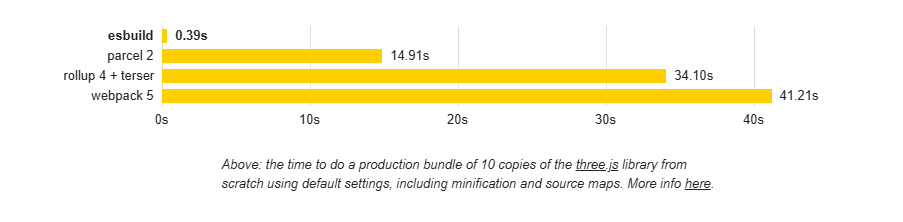
ESBuild taking Webpack head-on
Build Speed
- Webpack: Can take 30–60 seconds (or more) for large applications.
- ESBuild: Often completes the same job in under 2 seconds.
Memory Usage
- Webpack: Consumes a lot of memory due to its plugins and loaders.
- ESBuild: Optimized for minimal memory consumption.
Cold vs Hot Builds
- Webpack: Initial build is slow, but HMR (Hot Module Replacement) speeds up subsequent builds.
- ESBuild: Always fast, whether it’s a cold build or a hot rebuild.
Ease of Configuration: Simplicity vs Complexity
Webpack’s Configuration Maze
Webpack requires multiple plugins for simple tasks. For instance, adding multiple environment variables requires setting up a plugin:
const webpack = require('webpack');
module.exports = {
  plugins: [
    new webpack.DefinePlugin({
      'process.env.API_URL': JSON.stringify('process.env.API_URL'),
      'process.env.APP_ENV': JSON.stringify('process.env.APP_ENV')
    })
  ]
};
ESBuild’s Simplicity
No extra plugins, no unnecessary complexity.
require('esbuild').build({
  entryPoints: ['src/index.ts'],
  outfile: 'dist/bundle.js',
  bundle: true,
  define: {
    'process.env.API_URL': `'${process.env.API_URL}'`,
    'process.env.APP_ENV': `'${process.env.APP_ENV}'`
  }
});
Use Cases: When to Choose What?
When to Use Webpack
- ✔️ Large-scale applications with complex dependencies.
- ✔️ Need for extensive plugin support.
- ✔️ Fine-grained control over the build process.
When to Use ESBuild
- ✔️ Speed is the priority.
- ✔️ Simpler projects with minimal configuration needs.
- ✔️ When you’re tired of waiting for Webpack to finish bundling. (That’s me😅)
Conclusion
Webpack is like a Swiss Army knife — powerful but sometimes clunky. ESBuild is like a Formula 1 car — blazing fast but not as feature-rich. If you need a reliable, customizable solution for large applications, stick with Webpack. But if you’re building a modern, high-speed project and hate waiting, ESBuild is the way to go!
In the next article, we will explore how I migrated enterprise applications from Webpack to ESBuild with astonishing results!