Fix "Cannot read properties of undefined" in Production
Even with obfuscated & minified code.
TECHNICAL
Prateek M
1/28/20265 min read


“Cannot read properties of undefined” in production is the last thing any developer would like to confront. We all can agree that it is such a terrible experience to debug this error in production, where the bundle is obfuscated & minified. No proper stack trace, all minified variables, no debugger & a lot of confusion & guesswork. Ahh, now we share the same pain…
The cherry on top is their hefty count on the error tracking tool (often in multiples of thousands), which is interpreted as the end of the world.
Let’s admit this. No one likes to fix this. Senior developers often delegate it to the juniors. Juniors with limited knowledge of the architecture & codebase struggle to fix this issue. Oftentimes, its priority is reduced either to focus on “new features” or due to “less bandwidth”. It either stays in your Jira backlog forever or keeps rolling between the sprints.
Today, I’ll give you the step-by-step guide to fix these kinds of issues.
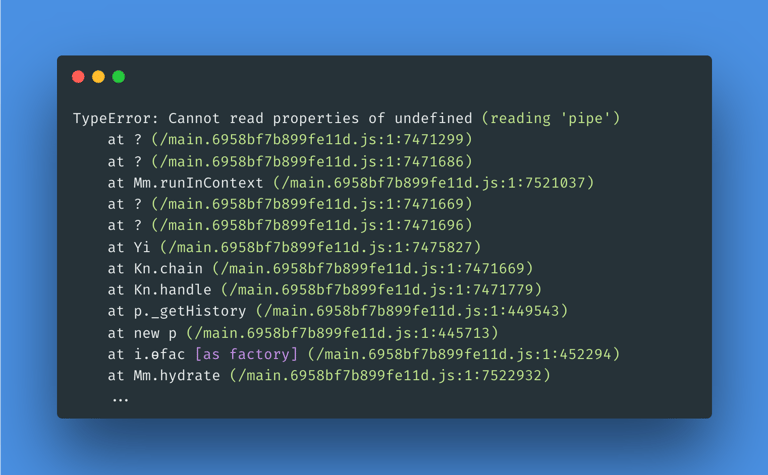
The most dreaded error of all time
Unfortunately, I was the one who got assigned this error (image above) in my project. A Senior Engineer asked me to look into it as there were no steps for reproduction, and he couldn’t find the root cause by just looking at the error stack trace. All that I had was this stack trace and an expectation of resolution.
Let’s go!
Root Cause Analysis
Stack Trace Insights
TypeError: Cannot read properties of undefined (reading 'pipe')
At first sight, it looks like any observable that is piped is undefined.
If you look at the stack trace, you won’t find anything at the top, but if you look a little further, then you will find a method name _getHistory().
at p._getHistory (/main.6958bf7b899fe11d.js:1:449543)
In Angular’s standard production build, minification preserves the names of methods starting with an underscore (_); it doesn’t automatically obfuscate them by default because it is dangerous and can easily break functionality, such as when methods are called via strings or external APIs.
I searched _getHistory() throughout the project. This is a known method in the source code.
It appears the error is due to this method. But in the method definition, there is no use of a pipe.
Where is the pipe?! Shouldn’t be a pipe present in the method, at least that’s what the stack trace tells!
Is the stack correct?
Frustrated, I searched again for the method in my project. It was called from 2 files, but neither of them had any pipes.
Great.
Since there is no pipe, we have to dig a little deeper because the stack trace never lies!
If you look back again at the stack trace:
at p._getHistory (/main.6958bf7b899fe11d.js:1:449543)
at new p (/main.6958bf7b899fe11d.js:1:445713)
at i.ɵfac [as factory] (/main.6958bf7b899fe11d.js:1:452294)
at Mm.hydrate (/main.6958bf7b899fe11d.js:1:7522932)
Now the origin of the error is confirmed, but the question that remains is–where is the pipe?
The _getHistory method calls an API endpoint to load the history. We have configured global interceptors in the project to handle the API errors. It was time to sniff the interceptors.
Decoding the Interceptor
As we only had the support of the stack trace, I again asked it for help.
at Kn.chain (/main.6958bf7b899fe11d.js:1:7471669)
at Kn.handle (/main.6958bf7b899fe11d.js:1:7471779)
at p._getHistory (/main.6958bf7b899fe11d.js:1:7449543)
The stack trace shows interceptor chain patterns: Kn.chain and Kn.handle.
Remember, we always call next.handle(req) method from our intercept method implementation? Now the stack makes more sense.
It is confirmed that the error originates from the interceptor.
Upon looking at the interceptor code, I found two critical bugs.
Bug 1 — Empty return statement
If the refresh token is invalid or the user is impersonated, we have to logout the user. The code block returned after logging out the user.
this.auth.clearStorage();
this.auth.logout();
return;
The return; statement returns undefined instead of an Observable!
Bug 2 — No return at all
Another code that deals with user authentication was in the catchError operator. In the catchError, if the API error status is 401, then logout the user.
catchError((error) => {
if (error.status === 401) {
this.auth.clearStorage();
this.auth.logout(); // <-- No observable returned after this
} else {
return throwError(() => error);
}
});
catchError must return an observable (or throw a new error) to ensure the stream remains a sequence of events that can be subscribed to and managed within the reactive programming paradigm.
As both places had empty or no return statements. The intercept method of HttpInterceptor must return an observable. In both the above bugs, no observable was returned, causing the issue to arise:
TypeError: Cannot read properties of undefined (reading 'pipe')
Angular HttpClient returns an observable; interceptor must return an observable; if it returns undefined, downstream code tries to call .pipe(...) on undefined.
Finally, we found the root cause!!
I returned EMPTY observable from both places, since the subscribers expected no value.
And boom! The error was gone. I kept an eye on the error logger & monitored it for an entire week for any new occurrences of the error. It was gone completely 🙂
Debugging steps to follow
The following steps can be followed to debug such errors:
Understand the error message, read through the error carefully and try to understand the context.
Debugging Angular internal symbols, such as ɵfac, hydrate etc.
Trace the call chain to see the path followed by the control during the exception.
Debug everything in between, check all the pipes, directives, interceptors that come in the path of the stack trace.
A few things to notice here, going from bottom to
hydrate & ɵfac: Represents dependency injection. It means the error originated while the service was injected. The _getHistory method belongs to a service, and this error occurs when the service is injected.
new p: It represents the instantiation of a new object. _getHistory is called by its service’s constructor. It means this error occurred right during service instance creation.
Prevention Checklist
Prevention is better than cure.
It is better to have some preventive measures in place to avoid such issues. Observable chains can get tricky at times, and such issues can silently remain present in your code without anyone noticing them.
The following configuration detects such issues and prevents them from coming in future:
TypeScript Configuration
{
"compilerOptions": {
"noImplicitReturns": true,
"strictNullChecks": true
}
}
ESLint Rules
{
"@typescript-eslint/explicit-function-return-type": "error",
"consistent-return": "error"
}
Final Thoughts
You should not easily trust your instincts. As we’ve seen, the error appeared to be coming from the _getHistory method, but it was later found to be in the interceptor code. Error messages for such exceptions can be misleading and tricky at times. The reason I chose this example is that it conveys two important lessons:
Understanding debugging by analysing the stack trace of minified code. We covered the meaning of the internal symbols used when such errors occur, which helps in tracking the exact location where the error originated.
Preventing similar exceptions in the future by making changes to your TypeScript and ESLint configurations. Trust me, issues like this can take a significant amount of time to fix.